- Define the deployment boundary first
- Is there a standard solution?
- Step 1: Put migrations in a pre-deploy hook
- Step 2: Pin the migration container to the release image
- Step 3: Find out why the migration environment was stale
- Add the missing preparation without rebuilding app exec
- Wire the command into the hook
- Before cutover does not mean every migration is safe
- Verify the actual deployment contract
- What this has to do with Rails maintenance and ownership
-
Related questions
- How do I run Rails database migrations with Kamal before deployment?
- Does Kamal automatically run Rails migrations?
- Should I use kamal app exec –reuse for migrations?
- Why does a Kamal pre-deploy command use old environment variables?
- Should migrations use pre-deploy or pre-app-boot?
- Can I run migrations from a post-deploy hook instead?
- Does a pre-deploy migration hook guarantee zero downtime?
- Is extending Kamal better than forking it?
- What should a Rails application takeover include for deployments?
For a separate Rails migration step before Kamal boots new application containers, use a before-boot hook, execute migrations from the exact image being deployed, and make sure the migration container receives the current environment. That last requirement is where our implementation became interesting.
While setting up Kamal for an existing Rails application, we needed schema changes applied before the new application containers started. The old release would continue serving requests during the migration.
We did not own Kamal. We did own the responsibility for making the application’s deployment work.
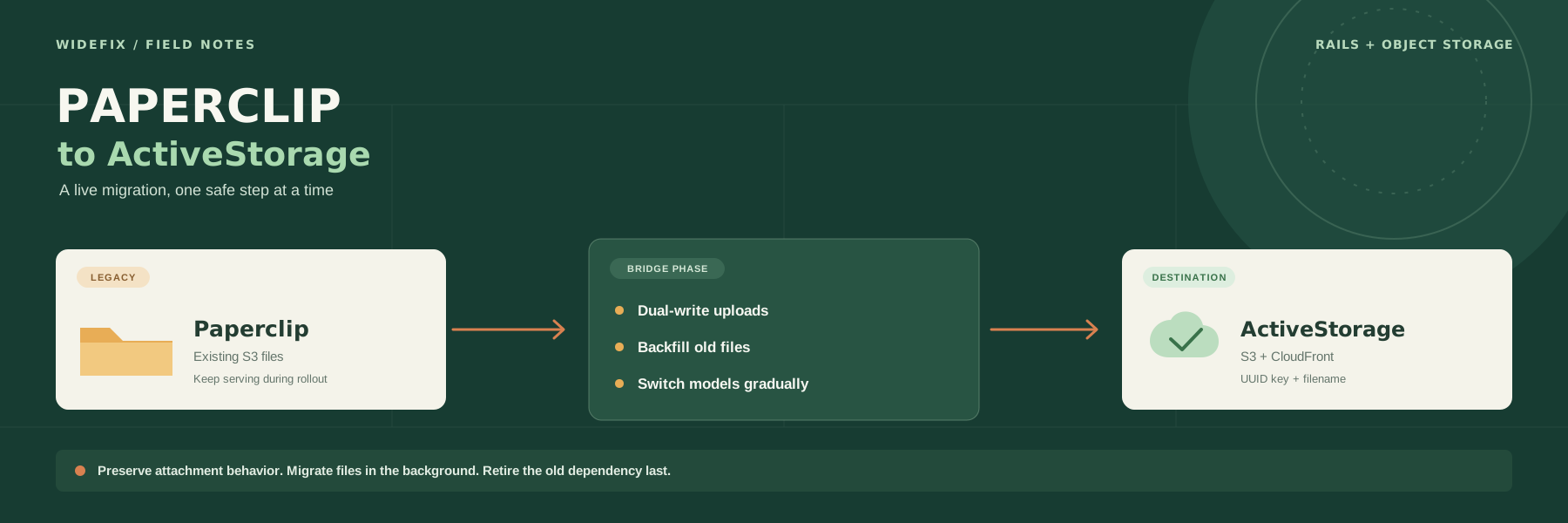
The Git history tells this story in three steps: a pre-deploy hook in May, explicit image version selection in June, and an environment-file fix in September. Each step addressed a different assumption about what a deployment command actually does.
This guide describes the behavior we investigated in Kamal 2.10.1. The Ruby extension below uses internal APIs, so check it against your locked Kamal version rather than treating it as a version-independent recipe.
Define the deployment boundary first
Our desired sequence was:
Build and deliver the release image
  -> refresh the migration role's remote secrets file
  -> run migrations from that exact image on one host
  -> boot the new application containers
  -> let the proxy switch traffic when they are ready
If refreshing secrets or running migrations failed, deployment needed to stop before booting the new release.
This is different from running migrations after deployment. By then, new code may already be receiving requests against an old schema. It is also different from putting migrations in every web container’s startup command: we wanted a single selected migration runner, not a migration attempt for every replica.
We chose the primary host of the web role. That is appropriate for this application’s shared database, not a universal design for applications with independent databases or shards.
Is there a standard solution?
Yes, for the usual Rails startup workflow: run db:prepare in the Docker entrypoint before starting the Rails server. Our separate, single-host migration step was a more specific requirement, not something every Kamal application needs.
The Rails default: prepare the database in the entrypoint
The Rails 8.0 generated Docker entrypoint includes this check:
if [ "${@: -2:1}" == "./bin/rails" ] && [ "${@: -1:1}" == "server" ]; then
  ./bin/rails db:prepare
fi
The entrypoint prepares the database before starting the server process. Under Kamal’s normal boot flow, that container receives the current role secrets before it starts, and the proxy does not send it traffic until it is ready.
This is the simplest starting point for a conventional Rails application. It is also the approach suggested in a Kamal first-deployment discussion. Check your actual entrypoint and server command: existing applications may not use the generated files, and the condition above only matches that command shape.
The distinction is before serving traffic versus before starting new application containers at all. The entrypoint solves the former. Our hook establishes a separate migration gate before application boot and selects one migration runner independently of replica startup.
The community hook approach and the secrets gap
Other teams use a before-boot hook with kamal app exec --primary --roles=web --version="$KAMAL_VERSION". They have encountered the same environment-file ordering issue:
-
basecamp/kamal#1180 reports that
app execdoes not push secrets, affecting fresh servers and migrations needing updated values. - In basecamp/kamal#1223, maintainers explain the tradeoff: ordinary console commands should not require every operator to have access to the configured secrets manager.
-
basecamp/kamal#1742 proposes an opt-in
--push-secretsflag. -
basecamp/kamal#1870 proposes uploading environment files before
pre-deploy.
When checked on October 20, 2026, both proposals were open and unmerged. They are not supported features of the Kamal 2.10.1 recipe in this article. Before copying a workaround, check your installed version’s app exec --help and the release notes: an upstream solution would be preferable to maintaining this extension.
There is another first-deployment detail in the community discussion: pre-deploy can run before the kamal Docker network has been created. A pre-app-boot hook runs later, after proxy/network setup in the normal deploy flow, but still before app containers boot. It does not by itself solve the missing secrets file.
For our existing deployment environment, we kept pre-deploy. For a fresh installation, ensure the network and database are provisioned first, or evaluate pre-app-boot with the same secrets preparation. That later hook runs per boot group, so review repeated execution rather than assuming it is a once-per-deployment hook.
| Approach | Best fit | What to watch |
|---|---|---|
Rails entrypoint with db:prepare
|
Conventional Rails startup before receiving traffic | Actual entrypoint command, replica startup behavior, migration duration |
Before-boot hook with app exec
|
An explicit migration gate using supported commands | Release version, remote secrets freshness, first-deploy prerequisites |
| Small Kamal extension | The hook needs current secrets and the installed version cannot push them | Internal API compatibility and upgrade testing |
We would not turn a migration failure into success with || true just to get an initial deployment through. Provision prerequisites explicitly instead of allowing a release to continue with an unknown schema state.
Step 1: Put migrations in a pre-deploy hook
Kamal provides a pre-deploy hook. In the 2.10.1 deployment implementation, it runs after image delivery and before app boot.
Our first hook used this command:
bundle exec kamal app exec --roles=web --primary "bin/rails db:migrate"
When using destinations, it also passed -d with the hook’s KAMAL_DESTINATION.
The important choices were:
-
pre-deployestablished the ordering before new application containers booted. -
--roles=web --primaryselected one host in the web role. -
No
--reusemeant starting a fresh command container rather than executing inside an already-running application container.
Hooks run on the machine invoking Kamal; app exec performs the remote container execution. The deployment machine therefore needs the application’s bundle and access to its Kamal configuration.
That gave us the right lifecycle boundary. It did not yet make the image selection explicit.
Step 2: Pin the migration container to the release image
A fresh container is not the same thing as an explicitly selected release.
In Kamal 2.10.1, app exec without --reuse uses version_or_latest. Without --version, that resolves to the configured latest tag.
We did not want migration correctness to depend on a mutable tag. The migration files must come from the release that is about to go live.
The June change made that relationship explicit:
bundle exec kamal app exec --roles=web --primary \
  --version="$KAMAL_VERSION" "bin/rails db:migrate"
KAMAL_VERSION comes from the hook environment. Passing it as --version to the nested command connects that separate invocation to the outer deployment’s release.
Do not substitute --reuse here. The currently running container can belong to the old release and lack the migrations you are trying to apply.
The history also contains small, empty probe migrations around this change. Those can help check whether a newly introduced migration reaches Rails’ migration tracking, but they do not prove a real schema change is safe. A staging check should verify both the recorded migration version and the intended schema effect.
Step 3: Find out why the migration environment was stale
The next fix addressed a less obvious dependency: the remote secrets file.
An image contains the application code. It does not automatically contain the current runtime secrets. In this Kamal version, the command container reads a role-specific environment file on the server.
We traced two paths in Kamal:
-
Kamal::Cli::App#execstarts the command container but does not upload the current role secrets first. -
Kamal::Cli::App::Boot#start_new_versionensures the environment directory exists and uploads the secrets file before starting an application container.
That explains the ordering problem:
pre-deploy: app exec reads the existing remote secrets file
app boot:  uploads the current secrets file
Our migration command ran before the step that normally refreshed the file it needed.
If configuration had changed since the previous deployment, the migration container could receive stale values. On a fresh setup, the required file might not exist yet. Passing KAMAL_DESTINATION and selecting the right image do not solve that.
This was not a reason to replace Kamal. It was a reason to understand its implementation.
Add the missing preparation without rebuilding app exec
The September fix introduced a small Ruby command that subclasses Kamal’s application CLI. It performs the environment preparation that migrations need, then delegates execution back to Kamal:
#!/usr/bin/env ruby
# frozen_string_literal: true

require 'kamal'

class KamalMigrate < Kamal::Cli::App
  desc 'migrate', 'Refresh remote role secrets and run release migrations'
  def migrate
    pre_connect_if_required

    on_roles(KAMAL.roles, hosts: KAMAL.app_hosts) do |host, role|
      app = KAMAL.app(role: role, host: host)
      execute(*app.ensure_env_directory)
      upload!(role.secrets_io(host), role.secrets_path, mode: '0600')
    end

    exec('bin/rails db:migrate')
  end
end

KamalMigrate.start(ARGV) if $PROGRAM_NAME == __FILE__
Save it as bin/kamal-migrate.
The command follows the same directory creation and secrets upload sequence used by Kamal’s boot code, including file mode 0600. The inherited destination, role, host, and version options keep selection within Kamal’s configuration model.
Here, exec is Kamal’s application CLI method, not Ruby’s process-replacement method. It retains Kamal’s command-container construction and remote execution behavior. We did not need to assemble our own docker run command, duplicate registry handling, or invent a second environment-file format.
We also did not patch the installed gem or copy its entire deployment implementation. The extension owns one missing preparation step.
That is still a maintenance commitment. KAMAL, on_roles, secrets_io, and the CLI inheritance structure are internal APIs. Pin the dependency through your lockfile, review changes to these paths during upgrades, and retest the integration.
Wire the command into the hook
The hook then invokes the custom command instead of kamal app exec.
This copyable version uses shell positional arguments to preserve quoting for the optional destination. It also checks for the release version explicitly:
#!/bin/sh
set -eu

if [ "${KAMAL_SKIP_DB_MIGRATE:-}" = "1" ]; then
  echo "pre-deploy: skipping db:migrate (KAMAL_SKIP_DB_MIGRATE=1)"
  exit 0
fi

: "${KAMAL_VERSION:?KAMAL_VERSION must identify the release image}"

ROOT="$(cd "$(dirname "$0")/../.." && pwd)"
cd "$ROOT"

set -- migrate
if [ -n "${KAMAL_DESTINATION:-}" ]; then
  set -- "$@" -d "$KAMAL_DESTINATION"
fi

echo "pre-deploy: migrating release $KAMAL_VERSION on the primary web host"
exec bundle exec ruby bin/kamal-migrate "$@" \
  --roles=web --primary --version="$KAMAL_VERSION"
Save it as .kamal/hooks/pre-deploy and make the hook executable:
chmod +x .kamal/hooks/pre-deploy
This hook assumes the selected host already has the kamal Docker network and database connectivity. The helper refreshes secrets; it does not provision the network or create the database. Use a deliberate database setup procedure for a new installation, and decide whether Rails’ broader db:prepare behavior is appropriate rather than silently substituting it for db:migrate.
The shell’s exec replaces the hook process, preserving the migration command’s exit status. In this Kamal version, a failed hook aborts deployment rather than allowing it to proceed to application boot.
The skip variable is an explicit escape hatch, not the normal deployment path. Kamal’s -H option skips all hooks, including this one; use it only when deliberately bypassing those safeguards.
This example always selects the primary web host. It does not forward arbitrary role or host filters from an outer deployment. Review that policy before adopting it for partial deployments, multi-database applications, or a different primary role.
Before cutover does not mean every migration is safe
The old application is still running while these migrations execute. Its background workers may also still be using the database.
The schema must therefore remain compatible with the old release as well as the new one.
Use an expand-and-contract rollout:
- Add a compatible schema change, such as a new nullable column.
- Deploy code that can work during the transition.
- Backfill separately when the work is too large for the deployment window.
- Move reads and writes to the new structure.
- Remove the old structure in a later release, after old processes no longer depend on it.
A destructive column rename does not become safe because it runs in a pre-deploy hook. A blocking table operation can still affect the live application.
Likewise, stopping deployment after a migration error does not undo changes already committed by earlier migrations or nontransactional operations. Rolling back an application image does not automatically roll back its database.
Verify the actual deployment contract
Before relying on this integration, test it against a disposable staging database and staging secrets. These are acceptance checks for adopting the recipe, not a claim that Git history alone proves every scenario:
| Scenario | What to verify |
|---|---|
| New migration in the release | The release version appears in hook output, and both Rails’ migration record and the expected schema change exist before new app containers boot |
| Changed environment value | A harmless staging-only marker reaches the migration process from the refreshed remote file; do not print secrets |
| Missing remote secrets file | The helper creates the directory and uploads the file before the command container starts |
| Fresh server prerequisites | The Docker network, database, and connectivity exist before the migration command runs |
| Multiple web hosts | The migration command executes on the selected primary web host, not every replica |
| Explicit destination | Staging configuration and its database are used, without touching production |
| Failing migration | The deployment exits unsuccessfully before booting the new application release |
| Repeated deployment | Already-applied migrations remain recorded, with no unexpected repeated schema or data changes |
| Old release still active | Representative requests and workers continue working against the expanded schema |
Check logs for ordering, not merely a successful final exit code. A deployment can finish successfully even when a migration had nothing new to run.
For a Kamal upgrade, repeat the environment-refresh and failure-path checks in addition to reviewing the relevant source diff.
What this has to do with Rails maintenance and ownership
When taking over an existing Rails application, the responsibility does not stop at its models and controllers. Deployment scripts, secrets delivery, containers, and third-party gems are part of the system that keeps the product working.
This is the kind of work we do at WideFix: taking over existing Ruby on Rails applications, taking technical ownership, and providing ongoing Rails maintenance.
In this case, ownership meant defining the deployment boundary, reading code outside the application, identifying an ordering assumption, and keeping the adaptation small enough for the next maintainer to understand.
You do not have to own a dependency to investigate it. You do have to own the consequences of depending on it.
If your deployments rely on undocumented manual steps, start by writing down when migrations run, which image they use, and how their environment reaches the server. If nobody can confidently answer those questions, that is a useful first task for a maintenance engagement or application takeover.
Related questions
How do I run Rails database migrations with Kamal before deployment?
Use an executable .kamal/hooks/pre-deploy hook to invoke a migration command on a selected host. Pass --version="$KAMAL_VERSION" so the command uses the release image. In Kamal 2.10.1, also ensure the role’s remote secrets file is refreshed before app exec reads it.
Does Kamal automatically run Rails migrations?
Kamal itself does not infer a Rails migration command. The Rails 8 generated Docker entrypoint runs db:prepare before its expected Rails server command, which is the standard starting point. Inspect your application’s actual entrypoint and hooks. If you add a separate migration gate, account for existing startup migration behavior rather than accidentally retaining two migration mechanisms.
Should I use kamal app exec –reuse for migrations?
Not when migrations must come from the incoming release. --reuse runs inside an existing container, which may contain the old application code. Use a fresh command container with an explicit release version instead.
Why does a Kamal pre-deploy command use old environment variables?
In the version we investigated, app exec reads the server’s existing role secrets file, while application boot uploads the current file later. Refreshing that file before running migrations closes the ordering gap.
Should migrations use pre-deploy or pre-app-boot?
pre-deploy gives an early gate before application boot, but requires the command container’s network to exist already. In Kamal 2.10.1’s normal deploy flow, pre-app-boot runs after proxy/network setup and before each app boot group. Neither hook automatically refreshes the remote secrets file for app exec in this version.
Can I run migrations from a post-deploy hook instead?
You can execute commands there, but it is too late for schema changes the new release needs at startup or on its first request. Reserve later work for operations that are safe after cutover.
Does a pre-deploy migration hook guarantee zero downtime?
No. It establishes execution order. Availability still depends on backward-compatible schema changes, database locking behavior, migration duration, worker compatibility, and application health checks.
Is extending Kamal better than forking it?
For this missing preparation step, a small subclass let us reuse existing behavior without maintaining a fork. It still depends on internal APIs. Start with supported hooks and commands; extend internals only when necessary, document why, and verify the extension when upgrading.
What should a Rails application takeover include for deployments?
Identify who owns the release process, inspect migration and entrypoint behavior, trace secrets delivery, and document failure and rollback procedures. Reproduce the process in staging so deployment knowledge is not confined to the person who originally set it up.