
In this post you will see how to turn off proration on Stripe.
Stripe is a popular payment system. And a very mature one. This service has a lot of built-in functionality that all contemporary businesses need online. One example of these features is subscriptions along with plans. When a subscription plan gets changed in the middle of the billing cycle, we might want to charge the client the new plan amount only for the remaining part of the current billing cycle and return the unused amount of the current billing cycle. So the price of the subscription is fair and calculated daily.
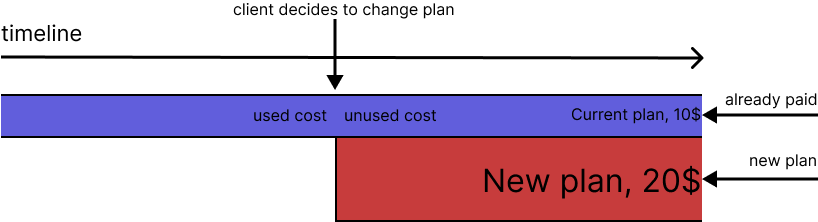
For example, the current plan costs $10. Assume the client has already paid for it. The new plan costs $20. The client switches plans in the middle of the billing cycle. The new plan daily amount for the remaining time of the current billing cycle is 1/2 of $20: $10. As it’s a plan upgrade and the new plan costs more, we could just charge them this $10. But wait, there is an unused daily amount from the current plan that’s 1/2 of $10: $5. In other words, the client has already paid some money for the remaining time of the current billing cycle. So, we deduct that money from the charge. As a result, in this example, we need to charge the client only $5. It’s calculated as $10 (the new plan for the remaining time of the current billing cycle) - $5 (money already paid for that period). This process of plan change calculations is called proration.
Graphically it can be explained as follows:
Stripe can calculate prorations for us. But that feature is available only for per-seat plans. In this post, you will see how to build a service written in Ruby from scratch that calculates prorations. It also demonstrates a ruby service object design pattern in action.
Prorations
Using the Ruby programming language with some tricks, we come up with the following class:
class PlanChangeProration
  extend Dry::Initializer
  extend Memoist

  option :user
  option :plan_id

  def unused_time_cost
    -(unused_time_line_item&.amount || 0)
  end

  def total
    [remaining_time_cost - unused_time_cost, 0].max
  end

  private

  def remaining_time_cost
    new_plan.price * 100 * new_plan_remaining_time / new_plan_billing_cycle_time.to_f
  end

  def new_plan_billing_cycle_time
    current_plan_used_time + new_plan_remaining_time
  end

  def current_plan_used_time
    proration_date - (unused_time_line_item&.period&.start || proration_date)
  end

  def new_plan_remaining_time
    (remaining_time_line_item&.period&.end || new_plan_period_end) - proration_date
  end

  def new_plan_period_end
    proration_date + (new_plan.is_yearly? ? 365.days.to_i : 30.days.to_i)
  end

  memoize def new_plan
    Plan.find(plan_id)
  end

  # For information about upcoming_invoice https://stripe.com/docs/billing/subscriptions/prorations
  def upcoming_invoice
    Stripe::Invoice.upcoming(
      customer: customer.id,
      subscription: subscription.id,
      subscription_plan: new_plan.name,
      subscription_proration_date: proration_date
    )
  end

  memoize def customer
    Stripe::Customer.retrieve(user.stripe_customer_id)
  end

  memoize def subscription
    customer.subscriptions.first
  end

  memoize def proration_date
    Time.now.to_i
  end

  # Stripe always generates 2 or 3 line items for the "upcoming invoice"
  memoize def upcoming_line_items
    return [] unless subscription
    upcoming_invoice.lines.data
  end

  # Line item with description "Unused time on Medium Team after 16 Jun 2022" (Medium Team is current plan)
  def unused_time_line_item
    upcoming_line_items[0]
  end

  # Line item with description "Remaining time on xl_team_without after 16 Jun 2022" (xl_team_without is new plan)
  def remaining_time_line_item
    upcoming_line_items[1]
  end
end
And this is how to use it:
service = PlanChangeProration.new(current_user, new_plan_id)
service.unused_time_cost # would return 5$ in our example
service.total # also 5$, but this is the charge amount
memoist and dry-initializer made this service clean and readable.
At WideFix, we specialize in connecting Rails applications to Stripe payment systems and maintaining them for optimal performance. Our team of experts has extensive experience in integrating Stripe into Rails apps, and we will work closely with you to ensure a seamless integration. We understand the importance of having a reliable and secure payment system for your business, and we are committed to providing the highest level of support and maintenance to ensure that your Stripe integration runs smoothly. Trust us to handle all of your Stripe integration and maintenance needs, so you can focus on growing your business.
Find out more about the services we offer on our official page at WideFix.com.