TL;DR: Follow the incremental approach below. Divide the entire problem into small sub-problems and deploy them one by one:
- define the new DB structure
- fill it in along with the old DB structure simultaneously
- migrate the old data to the new one
- define the new associations and make the code use them
- drop the old DB structure and the code that’s not relevant anymore.
In this article you will:
- learn how to maintain a Rails application in production with zero downtime
- see how to make necessary changes to the current DB structure and deliver new features
- figure out how to ship new features to production without outages, bugs and downtime
- understand Continuous Delivery through a case that happened with a Rails application in production.
Problem
Picture a Rails application that’s deployed to production. And it serves requests from real users all around the clock. That is, a live Rails application performs 24/7 for now and forever. Maintenance downtime is not desired and must be avoided as much as possible. This is the most important requirement a good business asks about, isn’t it?
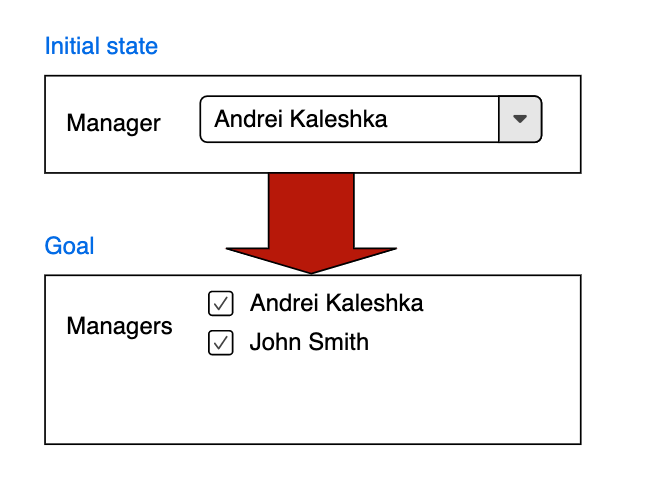
As time goes by, the business decides to make the following changes. There is a drop-down that allows one choice in the UI. But from now on it should have multiple choices. Speaking in ActiveRecord terms, there is a belongs to/has many association in the system that has to be changed to has and belongs to many.
A graphical explanation of the problem:
How to approach that? Well, someone might think it’s not a big deal for MVP, PoC, or a fresh startup without real users. And that’s true. In all these cases everything can be changed and redeployed with the old data deleted at the same time.
But for a mature live application with zero downtime requirements, where any data loss or bugs are not acceptable, this exercise might be a big challenge.
This post guides you step by step through making the transition above happen without any outages, breaks, data loss, or bugs. And it turns out the suggested idea follows the Continuous Delivery approach, clarifying what that tricky term means.
Starting point
The following example is meant to bring more clarity. It dives deep into the problem and lets you understand the described solution, so that the knowledge can help in similar situations.
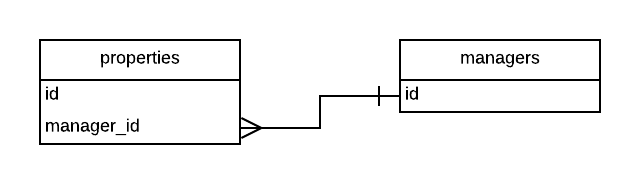
Consider a real estate system that has properties. And managers that are responsible for them, i.e. add properties into the system, keep them up to date, make them inactive/active/searchable/etc. From a Rails perspective that means there are Property and Manager models. They relate to each other as Property belongs to Manager and Manager has many Property:
class Property < ApplicationRecord
  belongs_to :manager
end

class Manager < ApplicationRecord
  has_many :properties
end
In the DB, it looks like this:
Nowadays, there are many technologies to implement UI. That’s why it’s barely possible to give a common recommendation on how to handle that part of the system. For simplicity, assume that UI is rendered by the traditional Rails approach on the server-side in “views”. The following assumptions and suggestions are based on this agreement.
From the code point of view it means that somewhere there are calls:
- on model, controller, or view layer that
- read data
@property.manager,@property.manager_id,@manager.properties,@manager.property_ids - write data
@property.manager_id=,@property.manager=,@manager.property_ids=,@manager.properties= - allow params
params.require(:property).permit(:manager_id)
- read data
- on view layer that
- render HTML
= f.input :manager_id, ...,select_tag :manager_id, ...,f.input :propery_ids, ..., etc.
- render HTML
Note, the methods above can be called explicitly. It’s possible to find them by “grepping” the code easily. Or they can be called implicitly. For example, with the mass assignment of parameters to the models. But nevertheless, whenever the property-manager relation needs to be addressed, the methods above are eventually called. And that in turn means, they form an interface. An API if you will.
Goal
Our destination is the following code:
class Property < ApplicationRecord
  has_and_belongs_to_many :managers
end

class Manager < ApplicationRecord
  has_and_belongs_to_many :properties
end
And its corresponding DB state:
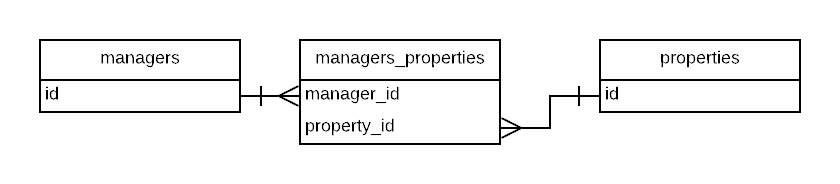
If the necessary changes take place at once it means the calls @property.manager, @properly.manager_id, @properly.manager_id=, @property.manager= are no longer possible. They are replaced with the respective calls @property.managers, @properly.manager_ids, @properly.manager_ids=, @property.managers=. In other words, they break the current interface - API mentioned earlier. And these changes at once are dangerous. They may impact the system. There may be a lot of changes that have to be deployed at a time. Eventually, that may lead to unexpected bugs or even outages. No well-established business would accept that.
What to do
For that reason, it’s better to deliver the changes gradually. That would allow shipping many small pieces to production continuously without blocking the whole development process or the entire business using the software. That would provide immediate feedback on whether the deployed small piece works or not. A small piece that doesn’t work can be fixed or rolled back much easier and faster than a huge bunch of changes. That reduces risks. It makes the delivery process comfortable and safe for both sides: the operating business and software development. It’s a guaranteed nerves-free process.
But first, these small self-sufficient pieces should be identified. That may seem hard and not obvious. In fact, this suspicion is correct. But once one understands how to do that through a particular example, like this one, similar cases should be easier to tackle.
In the very first step, think about the initial and the final stages. What’s the difference between them? Which places should be changed to move from the starting point to the final one? The previous sections have already established that. These are places to change:
-
DB structures. A new table
managers_propertiesfor the has and belongs to many association should be created and the old columnproperties.manager_idshould be deleted. -
Data. Remember, the old column has to be represented by another one
managers_properties.manager_idin the new state of the system. So there should be a data migration that fills in the new table with the old data. That prevents data loss when the new data structure comes into use. -
Active record API. Mind the old association
@property.managergets renamed to@property.managersalong with the bunch of automatically generated reader/writer methods. All the places that refer to these methods should be modified appropriately. -
UI. The drop-down with a single choice should be replaced with a group of check-boxes that allow selecting multiple managers (see the first picture of this article).
Step 1: DB structure changes
My suggestion is to start with the DB structure first if this step is present in the list of required changes. In our case, it’s there.
Its implementation is not hard: just make a usual Rails migration that creates the new table. It can be shipped without nerves at all.
Note that, like all subsequent steps, this is an easy change unlikely to break anything on production servers.
The only caveat is not to forget necessary indexes, foreign keys, columns with correct types, and constraints. Otherwise, a new migration should be added and deployed again. That takes time. So it’s better to spend some time on analysis of the requirements. Try to anticipate possible usages of the new structures at this stage. Time spent defining a correct DB structure is a good investment as it will save time later.
Let’s observe the following migration, which should satisfy all the needs:
class CreateHbtmTable < ActiveRecord::Migration[6.0]
  def change
    create_table :managers_properties, id: false do |t|
      t.belongs_to :manager, foreign_key: true, index: false, null: false
      t.belongs_to :property, foreign_key: true, index: false, null: false
    end

    add_index :managers_properties, [:manager_id, :property_id], unique: true
  end
end
Pay attention to the table name. It should contain the names of the two joined tables separated by an underscore, pluralized, in lexical order. Refer to the original documentation, if there are questions.
To keep the data integrity:
- the columns
manager_idandproperty_idare not nullable - there are foreign key constraints for them as they refer to other tables
- there is a unique index for
manager_id + property_id.
A PostgreSQL select query uses a multicolumn index if any of the filtering fields are part of the index. In other words, the compound manager_id + property_id index will come into play for both ActiveRecord statements .where(manager_id: ...) and .where(property_id: ...). That’s why there are no separate indexes for property_id and manager_id. This not only reduces the DB structure complexity but also saves space on the data store.
Keep in mind, this trick with complex indexes may not work for some older PostgreSQL versions or other databases, such as MySQL. That’s why this question should be verified in each particular case.
Step 2: start writing into the new DB structure
The previous step’s migration can be deployed without any problems. But the created table is not useful while nothing writes into it. While empty, there is no point in reading from it. Let’s start writing then!
We need to fill in the currently known data from the old belongs to association into the new table despite the fact it is supposed to hold the new has and belongs to many association. This trick guarantees that switching to the new association doesn’t lose any data. In other words, the data representing the manager-property association should be written into the old field properties.manager_id and into the new table managers_properties simultaneously.
There are at least two ways to do that in a Rails application: use ActiveRecord callbacks or DB triggers. Which one to choose is up to the code authors. Both solutions have pros and cons. Both work well if properly implemented.
Whichever way you choose, the following logic should be implemented:
- if
property#manager_idgets changed:- the
managers_propertiesrow havingproperty#idandproperty#manager_id_wasshould be deleted - the new row with
property#idandproperty#manager_idshould be inserted if the new value forproperty#manager_idis notnil
- the
- if a property gets removed, the corresponding row in
managers_propertiesshould be removed - if a manager gets removed, the corresponding association
property#managershould be nullified and the corresponding row inmanagers_propertiesshould be removed too.
If you go with ActiveRecord callbacks, it may require many changes and much more effort. Callbacks are skipped in some cases. For example, #update_column, #update_columns, .update_all calls on ActiveRecord models don’t execute callbacks. Take into consideration that these methods can be called with meta-programming implicitly. And now the implementation doesn’t look easy at all. All the code should be read carefully. And all the places that call these and possibly other methods should take care of the simultaneous write. Additionally, if some new code is added afterward and misses that point, there may be data inconsistency.
That’s why it’s better to use DB triggers. Once they are written they work as designed without any caveats. No need to read the whole codebase searching the methods above and changing those lines. No need to implement some tricky code, etc. Check out the implementation for PostgreSQL:
class AddTriggers < ActiveRecord::Migration[6.0]
  def up
    execute <<~SQL
      create extension if not exists plpgsql;
      create function update_managers_properties() returns trigger
      language plpgsql
      as $$
        begin
          if coalesce(new.manager_id, 0) != coalesce(old.manager_id, 0) then
            delete from managers_properties where manager_id = old.manager_id;
            if coalesce(new.manager_id, 0) != 0 then
              insert into managers_properties (manager_id, property_id) values (new.manager_id, new.id);
            end if;
          end if;
          return null;
        end
      $$;

      create trigger align_managers_properties after insert or update on properties
        for each row execute procedure update_managers_properties();
    SQL
  end

  def down
    execute("drop function update_managers_properties() cascade")
  end
end
Just run this migration and from now on changes to the belongs to association will make appropriate changes in the many-to-many table automatically.
It’s assumed the model code looks like this:
class Property < ApplicationRecord
  belongs_to :manager, optional: true
end

class Manager < ApplicationRecord
  has_many :properties, dependent: :nullify
end
Thanks to Rails’ dependent: :nullify option above, whenever a manager gets removed it sets manager_id to null for all of the associated properties. That change to null executes the DB trigger. That in turn means, all the data integrity requirements above are satisfied.
Now it’s time to deploy this migration to production.
Step 3: migrate the old data
But that’s not all when it comes to data. There is still old data in properties.manager_id without a related managers_properties row. This can be fixed with so-called “data migration”. In short, it’s just a code snippet that gets the job done. There are many ways to implement it. All of them can be found in another article Change data in migrations like a boss.
Run the following SQL snippet against the production DB and it does everything needed in this step:
insert into managers_properties (property_id, manager_id)
  (select id, manager_id from properties where manager_id is not null)
  on conflict do nothing;
The snippet is idempotent, so that it can be run many times without any harm to data. Also, it doesn’t conflict with any other process that is writing data into managers_properties at the same time due to whatever reason.
Step 4: verify data
To prove the data is consistent, it would be good to allow the system to work for a while with the deployed steps above. Say, for one week. After that run this script against production DB:
select id, manager_id from properties where manager_id is not null
  except
  select property_id, manager_id from managers_properties;
select property_id, manager_id from managers_properties
  except
  select id, manager_id from properties where manager_id is not null;
The first select statement checks whether all populated property-manager relationships have corresponding rows in the managers_properties table. It should return no results. The second one checks if there are no “aliens” in the new table. The result should be empty as well. Both statements together guarantee that the old belongs to/has many DB data structure is in sync with the new one - has and belongs to many.
Step 5: switch to has–and-belongs-to-many association
When the data integrity between the old and the new structures is proved, only one major step is left. This one relates to UI changes. It requires fixes in the remaining parts of a Rails application: models, views, controllers. Probably, the easiest place will be the model as it needs only the definition of the new relation:
class Property < ApplicationRecord
  has_and_belongs_to_many :managers
end

class Manager < ApplicationRecord
  has_and_belongs_to_many :properties
end
Changes to controllers may differ from project to project. But commonly the idea is to allow manager_ids instead of previous manager_id going through params. For example, if you use Strong Parameters the code params.require(:property).permit(:manager_id) should be changed to params.require(:property).permit(manager_ids: []).
On the view layer, the form that updates managers for properties may look like this:
= f.collection_check_boxes :manager_ids, Manager.all, :id, :id
All of these changes may be deployed at once or incrementally. For example, the views that render read-only information of the association can be delivered first. After this, controllers and models can be prepared for the new associations along with params structure without dropping the old functionality yet. Next, the UI that updates property managers can be changed.
Step 6: cleanup
In the final step, the outdated code should be just dropped. It may include the following changes:
- removal of the old
properties.manager_idcolumn. Keep in mind, it should be done in several steps: first, ignore the column on the code level, then delete the column from DB. More about this is here - removal of the old defined associations along with old
paramskeys - drop the trigger along with its function
- scripts/snippets/rake tasks that still refer to the old associations should be updated or deleted.
And those are all the steps needed to make the transition requested by the real estate business happen.
Conclusion
We’ve seen how a DB change in a Rails application with production setup should be done. This is a multistep process that is not fast. It takes time to make the transition happen without bugs and downtime. At first glance, the given task may seem too hard. But all the required steps are small and easy.
The described technique is a very powerful tool confirmed by experience on live applications. The post shows a concrete example of how to change a single select to multiple choices in the UI. But the idea applies to any transition that requires changes in DB on a Rails application that has production setup with zero downtime 24/7 requirements.
Unfortunately, it’s hard or even impossible to describe all the niceties of the whole process. There are still many aspects this article doesn’t show:
- how to identify the exact places in the code that require changes
- how to handle the migration if the UI is a separate single-page application (SPA)
- how to implement the parallel write into the old and the new DB structures if you use ActiveRecord callbacks. Is it worth it at all? Partially, this question was elaborated in this article. But those brief explanations may seem not convincing enough.