
Rails provides great functionality for managing layouts in a web application. Layouts remove code duplication in the view layer. You can divide all your application pages into blocks such as the header, footer, sidebar, body and so on. These are typical web application page blocks; almost every site has them. As a rule, the body block differs on each page. But sometimes we get into a situation when there are several pages with similar elements. For instance, it may be a progress bar in a wizard form. If there are many steps in the wizard form then it gets annoying to copy and paste the progress bar’s code into each step. Fortunately, Rails has functionality out of the box to solve this problem perfectly. And this is the aim of this post. At first glance, the problem may seem common, but I personally didn’t find the solution in any Rails book I’d read. I’ve only found it in the Rails documentation. For this reason, the post may be useful for every Rails developer.
The problem
This is a prototype of a general web page:
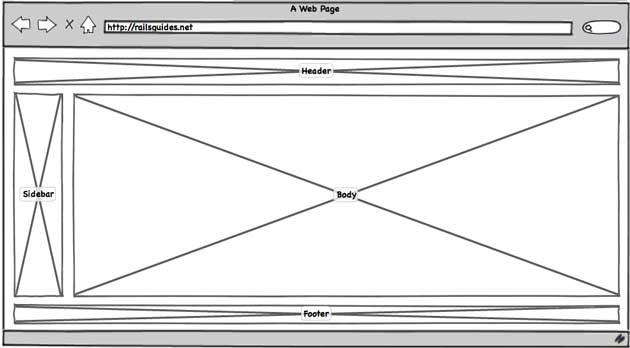
Every Rails developer knows how to specify a layout for it. Let’s refresh our knowledge. A generated Rails application has a default layout and it’s defined in app/views/layouts/application.html.erb. In the image above, there is only one dynamic block: the body. The footer, header and sidebar are common blocks on each page. So the layout code may look like this:
<!DOCTYPE html>
<html>
<head>
</head>
<body>
  <%= render 'shared/header' %>
  <%= render 'shared/sidebar' %>
  <%= yield %>
  <%= render 'shared/footer' %>
</html>
The yield in the code above is the place in which any action template will be rendered. This is the default Rails behavior.
But assume you have to make a layout system in the body block. In the image below, you can see an example of such a situation:
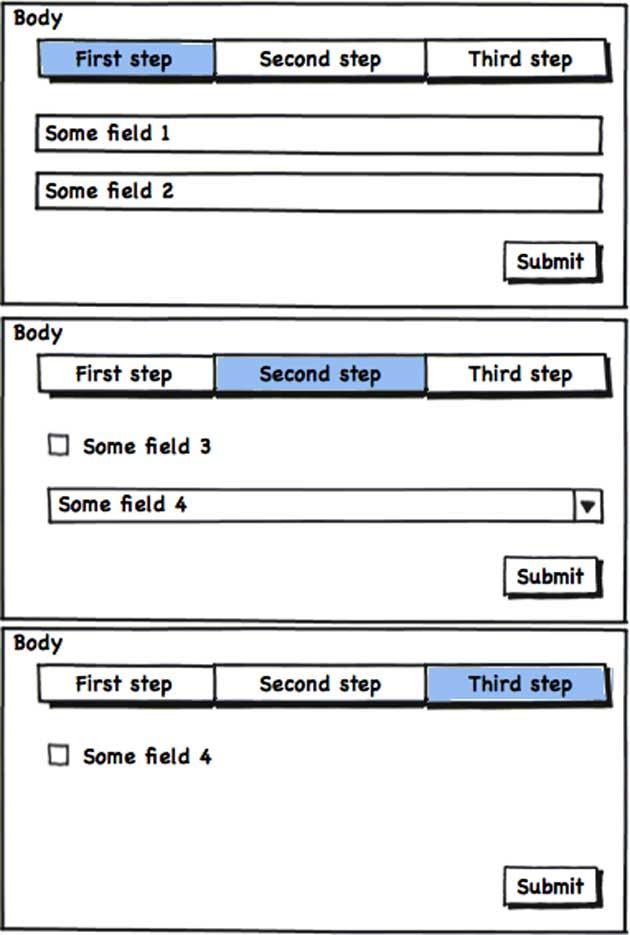
As you can see, each of these three steps includes common blocks: the progress bar and the “Submit” button. When you start implementing the steps, you will see repetitive code, such as form tags. This is the problem of nested layouts. Of course, we could copy and paste the code for these blocks, but that’s not our way.
The solution
As you can guess, Rails provides functionality to solve the problem out of the box. It is solved by using partials
as layouts. The render helper accepts the :layout option, where you can pass the path to a partial that will also be
the layout. Let me repeat that: a partial is a layout at the same time.
Define the partial that will be the layout for the wizard form. Its path may look like this: app/views/wizard/_step.html.erb:
<%= render_progress_bar(current_step) %>
<%= yield %>
Notice that it uses the same approach for dynamic blocks: yield does the same thing here. Now, when you are at a step of the wizard form, use the render helper with the :layout option and pass it the path to the partial. This is our 1st step, located in app/views/wizard/step1.html.erb:
<%= render layout: 'step' do %>
  <%= form_for resource, url: submit_path do |f| %>
    <%= f.input :some_field %>
    <%= f.submit %>
  <% end %>
<% end %>
Now, when the first action renders, the application layout is applied first. Rendering then reaches this template, renders the app/views/wizard/_step.html.erb partial as a layout, and passes the rendered form to yield (the 2nd line in app/views/wizard/_step.html.erb).
The problem is solved — we don’t have annoying, repetitive code rendering the progress bar in every step template. But we still have repetitive code creating forms with form_for and the “Submit” button in each template. We can also move this code to the partial-layout and pass the form variable f as an argument to yield:
<%= render_progress_bar(current_step) %>
<%= form_for resource, url: submit_path do |f| %>
  <%= yield f %>
  <%= f.submit %>
<% end %>
And now our template for the first step contains much less code:
<%= render layout: 'step' do |f| %>
  <%= f.input :some_field %>
<% end %>
In the templates for other steps, we should change only their form fields.
If you want to know more about render’s capabilities, please follow the official documentation.
Conclusion
Nesting layouts reduces a lot of code duplication. Use the render layout approach described in this post and the coding will bring you more joy.
