
Using FactoryGirl may cause issues in tests when you have complicated database relationships. If you don’t pay enough attention to integrity in your tests, you may get stuck with inconsistent data. The idea of this blog post is to show the problem and give a solution to avoid it in your work. It will also help some Ruby developers avoid this issue.
Problem
Imagine you have a User model related to an Account through a many-to-many relationship. Both User and Account belong to a Company, and it’s impossible to attach a user from company #1 to an account from company #2. In general, this is an obvious business rule, and developers usually don’t have validation or a restriction for it in an application’s persistence layer. Mostly, it is implemented in the business layer (the controller layer in MVC frameworks).
This is the UML diagram of the tables:
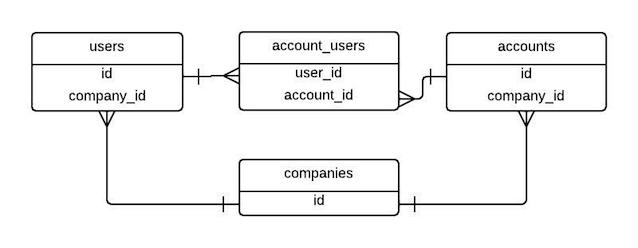
Using Rails’ ActiveRecord we would specify the following classes and relations:
class Company < ActiveRecord::Base
  has_many :users
  has_many :accounts
end

class User < ActiveRecord::Base
  has_many :account_users
  has_many :accounts, through: :account_users
  belongs_to :company
end

class Account < ActiveRecord::Base
  has_many :account_users
  has_many :users, through: :account_users
  belongs_to :company
end

class AccountUser < ActiveRecord::Base
  belongs_to :user
  belongs_to :account
end
NOTE: We won’t discuss why we don’t use Rails’
has_many_and_belongs_toassociation here. The topic is worth its own discussion, and it’s up to you what to use. But the specified relationships will let you understand the problem.
Then using FactoryGirl in the tests you will have the following obvious (at first glance) factories:
FactoryGirl.define do
  factory :company do
  end
end

FactoryGirl.define do
  factory :user do
    company
  end
end

FactoryGirl.define do
  factory :account do
    company
  end
end

FactoryGirl.define do
  factory :account_user do
    account
    user
  end
end
Now we are at the last step in understanding the problem. Let’s go to the Rails console in the test environment and try to create an account-user model with the specified FactoryGirl factory:
$ rails c test
irb(main):001:0> account_user = FactoryGirl.create(:account_user)
=> #<AccountUser id: 1, account_id: 1, user_id: 1>
irb(main):002:0> account_user.user.company
=> #<Company id: 2>
irb(main):003:0> account_user.account.company
=> #<Company id: 1>
Look at the results of the second and third commands: they return company #1 and company #2, respectively, and this is the issue. Remember our business rule: this situation shouldn’t be possible. In a layer above (maybe in controllers, form objects, policy objects or elsewhere), we may have validation, and the application is ready for production or development. But when we run tests, we have an inconsistency. This may cause many test problems, from performance issues to unexpected behavior that is difficult to debug.
If you still don’t get the problem, here is a clue that may show you are doing things the wrong way: in tests, you may have the following step-by-step environment setup:
company = create(:company)
user = create(:user, company: company)
account = create(:account, company: company)
account_user = create(:account_user, user: user, account: account)
And this combination finally gives us a valid account user relationship. Note that creating it takes four lines of code instead of one simple line: create(:account_user). Imagine you have many such relationships in a database, and you should understand the nightmare.
Solution
Fortunately, FactoryGirl has a lot of useful functionality, and one feature solves the problem very easily: the ignore method (on 29 April 2014, it was renamed to transient, and as I understand it, the new release will require the new name). This method lets us define virtual attributes on a factory. After that, we can pass additional options when constructing a model with FactoryGirl’s create or build method.
This is a simplified explanation of the method’s purpose and describes only my understanding of it. If you aren’t happy with the explanation or want to know more, please read the full documentation here.
Secondly, we have to know that FactoryGirl has lazy (in other words, dynamic) attribute syntax. Pass a block to an attribute when you declare a factory. It will be evaluated every time a model is constructed, and the result will be assigned to the attribute.
Here we are and this is the improved factory:
FactoryGirl.define do
  factory :account_user do
    ignore do
      company { create(:company) }
    end

    account { create(:account, company: company) }
    user { create(:user, company: company) }
  end
end
Now test the factory:
$ rails c test
irb(main):001:0> account_user = FactoryGirl.create(:account_user)
=> #<AccountUser id: 1, account_id: 1, user_id: 1>
irb(main):002:0> account_user.user.company
=> #<Company id: 1>
irb(main):003:0> account_user.account.company
=> #<Company id: 1>
Bingo! We’ve solved the issue with the few lines of code. Now our factories give us possibility to refactor the tests, they don’t create trash in the environment and the data is integral!
As a bonus we can even pass a custom company to the factory constructor and it will create for us a user in the company, an account in the company and the account user relation:
irb(main):001:0> company = FactoryGirl.create(:company)
=> #<Company id: 1>
irb(main):002:0> account_user = FactoryGirl.create(:account_user, company: company)
=> #<AccountUser id: 1, account_id: 1, user_id: 1>
irb(main):003:0> account_user.user
=> #<User id: 1, company_id: 1>
irb(main):004:0> account_user.account
Awesome, isn’t it?
Conclusion
I know somebody will say these are obvious things, but I’m sure many Rails developers still have such issues in their projects. That’s why I decided to write the article to warn them.
FactoryGirl is powerful software that gives us cool features for web development in Ruby. But you should use it with caution to identify issues like the one in this post and solve them in time. It will save you from a nightmare and perhaps make you a happy Ruby developer. I don’t promise you will be a happy Ruby developer after this, but at least your development process should bring you more satisfaction.
Now you are armed with a tool that protects you from the pitfalls we have in our project. I hope you don’t get stuck with this issue.
