
There is a list of reserved words for the Ruby on Rails framework. The full list is here. But it is missing at least one word, which I will describe in this post. There are many reasons not to name your models Test in Ruby on Rails. In this post, I will try to describe the problems you will have if you name a model Test.
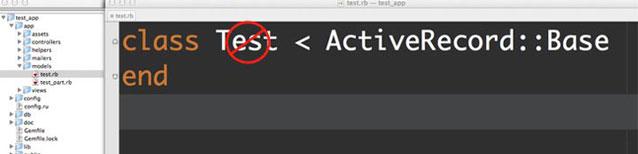
Let’s start by creating a new application:
~$ rails new test_app --skip-test-unit --old-style-hash --skip-javascript --skip-bundle --skip-git
~$ cd test_app
~/test_app$ bundle install
Make models Test and TestPart:
test_app$ rails g model test name:string
test_app$ rails g model test_part name:string test_id:integer
test_app$ rake db:migrate
Reason 1: Test is not a class. It is a module!
I want to debug my code. So I’m opening the Rails console by typing rails c in the terminal and trying to find all Test instances in my database (I didn’t create any, so I should get an empty collection):
irb(main):001:0> Test.all
NoMethodError: undefined method `all' for Test:Module
What happened? I’m trying to get all the tests in my db, but I get an error instead of an empty collection. We will find the answer in the Rails console:
irb(main):002:0> Test.class
=> Module
This is a module, not a class as we expected. The Test module exists in TestUnit, and even if we aren’t using TestUnit in our application, we will have this confusion. To avoid this situation, we can rename the Test class to MyTest, for example. Let’s do it manually:
test_app$ mv app/models/test.rb app/models/my_test.rb
Remember, if we have a MyTest model, it will connect to the my_tests table, but we don’t have this table. So we have 2 ways to solve this problem:
- Rename the tests table to my_tests. We should create a new migration to do it.
- Set a custom table name for the MyTest model. In our case, it is tests.
I will use the 2nd option because it will take less time:
app/models/my_test.rb
class MyTest < ActiveRecord::Base
  self.table_name = 'tests'
end
You must use self.table_name here, not table_name =. Otherwise, it won’t have the expected effect.
Try to test what we did and how it works now:
irb(main):003:0> reload! # we have changes in code so we have to reload console to get changes here
irb(main):004:0> MyTest.all
  MyTest Load (0.1ms)  SELECT "tests".* FROM "tests"
=> []
And, yes! It’s working correctly now!
Reason 2: Uniqueness validation within a scope
Assume MyTest has_many TestParts and TestPart belongs to MyTest:
app/motest/test_part.rb
class TestPart < ActiveRecord::Base
  attr_accessible :name, :test_id
  belongs_to :test, :class_name => 'MyTest'
end
app/models/my_test.rb
class MyTest < ActiveRecord::Base
  attr_accessible :name
  self.table_name = 'tests'
  has_many :test_parts, :foreign_key => 'test_id'
end
Check it out:
irb(main):009:0> reload!
irb(main):010:0> t = MyTest.new(:name => 'My first test')
=> #<MyTest id: nil, name: "My first test", created_at: nil, updated_at: nil>
irb(main):011:0> t.test_parts.build(:name => 'Test part 1')
=> #<TestPart id: nil, name: "Test part 1", test_id: nil, created_at: nil, updated_at: nil>
irb(main):012:0> t.test_parts.build(:name => 'Test part 2')
=> #<TestPart id: nil, name: "Test part 2", test_id: nil, created_at: nil, updated_at: nil>
irb(main):013:0> t.save
=> true
irb(main):014:0> t.test_parts
=> [#<TestPart id: 1, name: "Test part 1", test_id: 1, created_at: "2012-03-02 22:49:51", updated_at: "2012-03-02 22:49:51">, #<TestPart id: 2, name: "Test part 2", test_id: 1, created_at: "2012-03-02 22:49:51", updated_at: "2012-03-02 22:49:51">]
Perfect! Everything is working.
Let’s try to add uniqueness validation for test part names, scoped to test_id:
app/motest/test_part.rb
class TestPart < ActiveRecord::Base
  attr_accessible :name, :test_id
  belongs_to :test, :class_name => 'MyTest'
  validates :name, :uniqueness => {:scope => :test_id}
end
Try to save test parts with the same name to my test:
irb(main):016:0> reload!
irb(main):017:0> t = MyTest.create(:name => 'My second test')
=> #<MyTest id: 2, name: "My second test", created_at: "2012-03-02 23:06:30", updated_at: "2012-03-02 23:06:30">
irb(main):018:0> t.test_parts.build(:name => 'Test part')
=> #<TestPart id: nil, name: "Test part", test_id: 2, created_at: nil, updated_at: nil>
irb(main):019:0> t.test_parts.build(:name => 'Test part')
=> #<TestPart id: nil, name: "Test part", test_id: 2, created_at: nil, updated_at: nil>
irb(main):020:0> t.save
=> true
irb(main):021:0> t.test_parts
=> [#<TestPart id: 3, name: "Test part", test_id: 2, created_at: "2012-03-02 23:06:56", updated_at: "2012-03-02 23:06:56">, #<TestPart id: nil, name: "Test part", test_id: 2, created_at: nil, updated_at: nil>]
Oops! We have trouble here. We added uniqueness validation for the name field of test parts, and we should be able to save only one test part with the same name for my test. But… we did it!
We have 2 ways to fix this problem:
- Rename table tests to my_tests and remove line
self.table_name = 'tests'fromapp/models/my_test.rb - Rename the test_id column to my_test_id and update the code accordingly: use test_id instead of my_test_id everywhere in the application.
I think it is very important to find these bugs in your application before you start writing it and using it in production. So I hope these Rails quirks described in my post will help you avoid coding problems in the future.
That’s what I wanted to tell you today. See you in the next posts!
